Abstracts and Awards - Resuscitation Science Symposium
November 7–8, 2026
McCormick Place Convention Center, Chicago, Illinois
Presentation Guidelines
Download these instructions or click the Invited Speaker and Oral Abstract Presenter Guidelines tab to read them online.
Overview
In order to provide the best possible educational environment and ensure smooth and efficient handling of audiovisual presentations, please read and follow the guidelines below.
AV Equipment Provided
There will be technicians in each meeting room. Session rooms will be equipped with a 16:9 format screen and LCD projector, lectern with microphone, large display speaker timer and monitor.
Important Slide Formatting and PPT Tips
It is recommended that all PowerPoint presentations be created/submitted in a 16:9 (widescreen) format.
How to create your 16:9 PowerPoint:
- Open PowerPoint on your computer
- From the top menu, (depending on the version of PowerPoint you have) select Design, then Page Setup OR File, then Page Setup, OR Design, then slide size, and change Slides sized for to: On-screen Show (16:9).
- Click OK
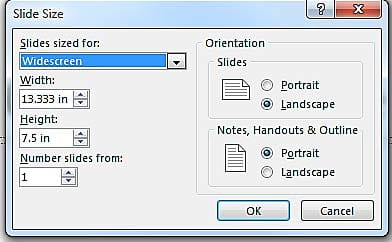
If you start with the step in the creation of your presentation, then just assemble the PowerPoint as you normally would. If you are converting an existing slide show, then please check all of the slides for format accuracy.
The widescreen format should not cause any issues with the text in your presentation, however some images may be stretched as a result. If your presentation has multiple images, a suggested way to transition to widescreen format is to save a copy of your current PowerPoint in the 4:3 format under a different name, then convert to widescreen, and cut and paste the images from the original version into the widescreen version.
- For optimal legibility, use a maximum of six lines of text and six words per line per slide (equals one frame in an electronic format).
- We request that you use Arial as it is a common cross-platform compatible font. Serif fonts like Times New Roman do not project well.
- A minimum slide typeface of 24 point is recommended.
- Use color for emphasis only. White or yellow lettering on a blue background is attractive and easy to read. DO NOT USE BLUE, RED or GREEN text.
- Use common image formats that are cross-platform compatible such as JPG, PNG, GIF, and BMP.
- Keep illustrations simple. Significance of data can be grasped more quickly in a simple graph form than in tabular form. Use rounded figures. Use captions sparingly.
- Sound and Video Clips: Solution 1: Pack and Go: The "Pack and Go" feature of PowerPoint embeds the clip into your presentation file. This ensures that the clip will be in the correct location when you unpack the file on the meeting room computer. Solution 2: Location of audio/video files: Create the presentation with the audio/video files in the same folder. PowerPoint looks in the immediate folder before generating the error that states it cannot find the audio/video file. Always check your video clips in the speaker ready room to make sure they have been embedded correctly.
- While it is recommended that all PowerPoints are formatted in 16:9, we can accommodate PowerPoints in 4:3. However, please note that when your presentation is displayed on the large screens for the audience, there will be black bars on the sides of your presentation slides.
- All PowerPoint files must be labeled with the date, time, and last name of the presenter.
- When building your presentation, all files (PowerPoint and external, i.e. movie files) associated with your presentation must be loaded separately and saved in the same folder as the rest of your presentation.
- Save your file to a memory stick.
- If you feel that your presentation has something out of the ordinary (extensive files or video clips), please bring your laptop to the meeting as back-up.
At the meeting:
- Your presentation must be uploaded in SPEAKER RESOURCE ROOM at least two (2) hours prior to the start of your scheduled SESSION START TIME. Individual laptops will not be allowed at the podium.
- Any updates to your presentation MUST BE MADE in the Speaker Resource Room and not your session room.
- A technician will show you to a computer station to review your presentation and help you load it onto the computer.
- Once you are done reviewing your presentation, be sure to notify a technician so he or she can verify that the presentation is saved and properly labeled. Once the technician has verified that the presentation is labeled correctly, please check-out of the Speaker Resource Room. This will ensure that your presentation gets to your session in a timely manner.
- All presentations will be loaded by a technician onto the presentation computer in the session room.
- If you have embedded video in your presentation, you MUST test that your presentation can be “read” properly in the Speaker Resource Room prior to your presentation (preferable 12 hours in advance of your presentation).
- It is the presenter’s responsibility to collect his or her own media (if applicable) at the conclusion of the session.
The Speaker Resource Room is available for reviewing, editing and loading your presentation. All presentations must be handed in to the technician at least two (2) hours prior to the start of your scheduled session start time.
Presenter Disclosure – Mandatory
- All presenters are required to have a conflict of interest disclosure slide as the first or second slide of your PowerPoint presentation.
- Moderators do not need to have a disclosure slide, but they should verbally disclose to the audience any applicable conflicts of interest they may have when they introduce themselves at the beginning of the session.
- If unlabeled use of a commercial product, or an investigational use not yet approved for any purpose is discussed, you must include this information on the disclosure slide. Give the name of the product and disclose that the product is not labeled for the use under discussion or that the product is still investigational. You must also verbally disclose this use to the audience.
- If you are referencing work within your presentation previously published by another author, be sure to include a complete citation at the bottom of the appropriate page.
- Exclude any information from your presentation that may compromise or violate patient confidentiality.
Presentation
Please arrive at your session meeting room at least 15 minutes before the start of your session. Take time to familiarize yourself with the setup at the lectern. There will be a mouse at the lectern that will allow you to control/advance (left click will move forward, right click will move backwards) the slides during your presentation. The technician will be available throughout the session.
On the floor in front of the lectern you will find a large plasma monitor where you can view your presentation as seen on the screen. At the end of each session day, all presentations are deleted from the meeting room computers.
Should you have any questions, please contact [email protected] and include “ReSS Conference” in the subject line.
Congratulations to the 2026 Awardees
- Dickinson W. Richards Memorial Lecture
- Demetris Yannopoulos, MD
- 3CPR Emergency Medical Services (EMS) Travel Stipend
- Christopher Marabello, NRP
- Eric Hicken, CPM, MICP
- Isaac Elias
- Kameron Fahimi
- Nathan A Harig, NREMT-P
- Paul Dudley White International Scholar Award
Abstracts submitted to the Resuscitation Science Symposium 2026 may be considered for a Paul Dudley White International Scholar Award. This award recognizes authors who contributed to the highest ranked accepted abstract from each country. You don't have to apply, and professional membership is not required.
Visit the Paul Dudley White International Scholar Award web page to view this year’s winners.